ShopDreamUp AI ArtDreamUp
Deviation Actions
Daily Deviation
Daily Deviation
May 12, 2008
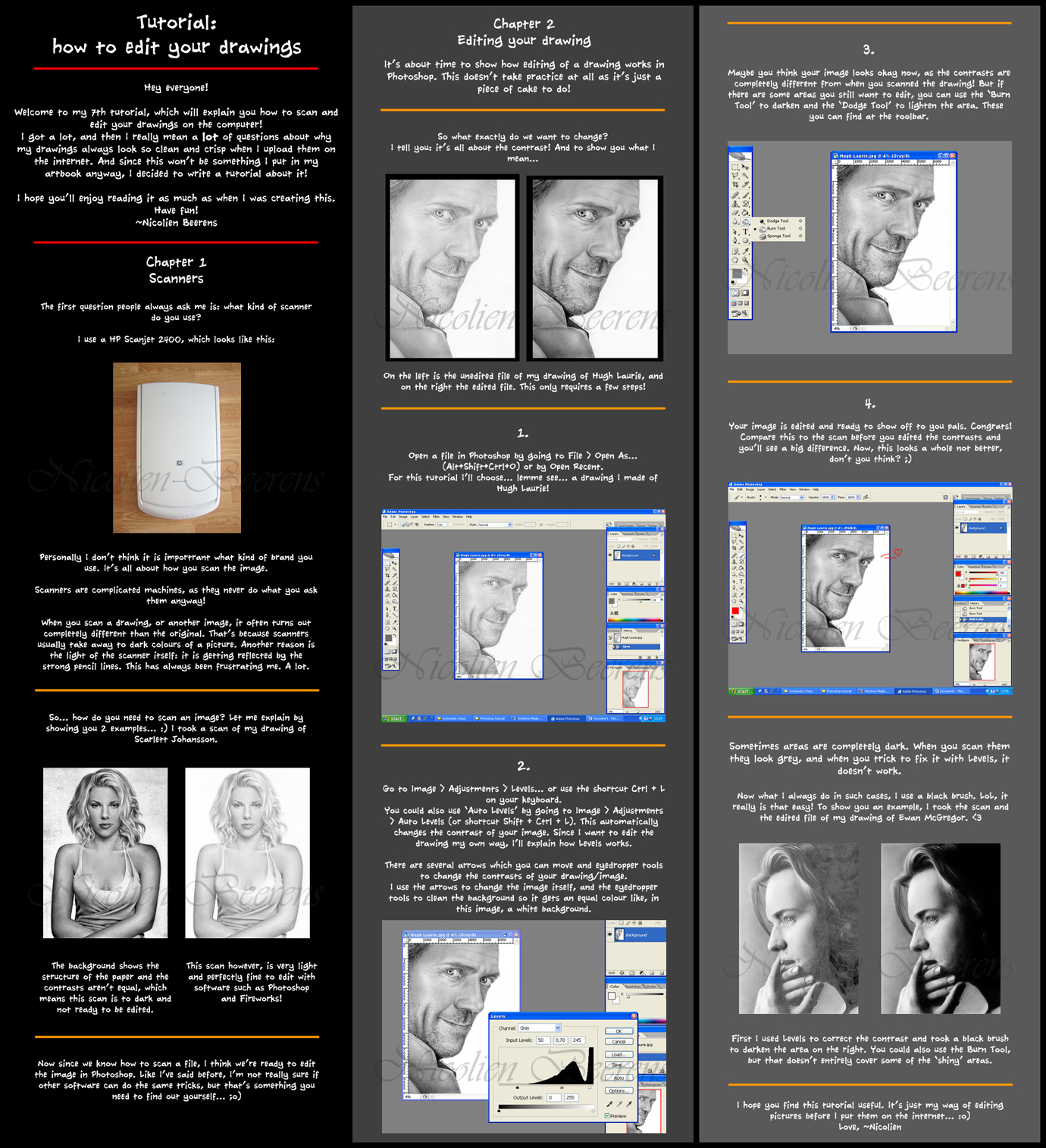
Tutorial: Editing Drawings by =Cataclysm-X offers valuable tips for bringing out the best in your traditional drawings after they have lost their depth and luster due to scanning.I am sure this technique will help many traditional artists in the presentation of their work .Take the time to browse the rest of her fabulous in-depth tutorials.
Featured by znow-white






Description
Yes, I made a new tutorial! This time it's about how scanners work and how I edit drawings in Photoshop.
I know I said I wouldn't make any more tutorials, but I got soooooooooo many questions about this, and it's something I won't be putting in my artbook anyway, so I've been working on this all day long.
And now I'm tired...
Oh well, hope it's useful
Watch my other tutorials here!
Eye tutorial
Nose tutorial
Hair tutorial
Shading & Blending tutorial
Drawing Progress tutorial
Detailed Hair part 1
Detailed Hair part 2
I know I said I wouldn't make any more tutorials, but I got soooooooooo many questions about this, and it's something I won't be putting in my artbook anyway, so I've been working on this all day long.
And now I'm tired...
Oh well, hope it's useful
Watch my other tutorials here!
Eye tutorial
Nose tutorial
Hair tutorial
Shading & Blending tutorial
Drawing Progress tutorial
Detailed Hair part 1
Detailed Hair part 2
Image size
1380x1515px 999.94 KB
Comments431
Join the community to add your comment. Already a deviant? Log In

Oh wow, this is incredibly helpful! Over the weekend I went to Staples to scan some graphite art. (Staples destroyed it - the entire thing came out horribly whitewashed and grainy looking). While that scan is completely unusable, your tutorial has given me hope that scanning graphite drawings IS possible. I'll have to try scanning it again over there! Thank you so much!!!